ARPort SafetyVR · Work at height
VR work at height training simulator
Practical scenarios for choosing PPE, using fall protection systems, assessing risks and evacuating a casualty.
Learners practise on a virtual construction site while the instructor selects task settings and reviews their results.

Skills learners practise
Select and inspect PPE
Choose a harness, lanyard, helmet and other equipment for the task. Identify defects and select suitable attachment points.
Use fall protection
Ascend, descend and move using the assigned fall protection system. Reconnect carabiners and maintain protection when moving between points.
Identify hazards
Inspect the work area for unsafe walkways and missing guardrail components. Remove hazards or mark the hazardous area.
Use the equipment
Complete tasks on scaffolding, an antenna mast, a stepladder or a leaning ladder. Use work positioning or rope access equipment.
Evacuate and assist a colleague
Use an emergency rescue device to descend or rescue a person suspended in their fall protection system.
Review actions
Review scores and explanations for actions, errors and missed steps. Identify improvements and repeat the task.
Training scenarios
Choose a focused task or a combined scenario covering preparation, work on scaffolding and emergency response.
Combined scenario
Select equipment, climb the scaffolding, identify and remove hazards, then respond to a fire and evacuate.
Ascent and descent
Climb to the third-floor level, collect a tool and return using the assigned fall protection system.
Work positioning
Climb an antenna mast, secure your working position with a positioning lanyard and repair the antenna mounting.
Rope access
Ascend a rope to the task location, collect a tool and descend using a descender.
Stepladder work
Select, inspect and position a stepladder. Collect a tool or carry out drilling, as selected by the instructor.
Leaning ladder work
Select and position a ladder, use the required PPE and complete a task at height. Tool collection and drilling variants are available.
Evacuation
Evacuate from the upper scaffolding level during a fire using the emergency rescue device provided in the scenario.
Casualty rescue
Report the incident and lower a suspended person using a rescue device.
An introductory demo task lets learners collect a tool from the scaffolding and return while practising safe movement.
See the simulator in action
The English-language video shows the virtual site, equipment selection and tasks in the work at height simulator.
How a session works
Choose a task and settings
The instructor selects the task, fall protection system, task variant, guidance and session conditions.
Practise in VR
Learners complete the task in VR. Learning mode provides guidance, while feedback shows scores and explanations for actions.
Review results
The instructor reviews correct, incorrect and missed actions, session time and the final score. The task can then be repeated.
Involve the whole group
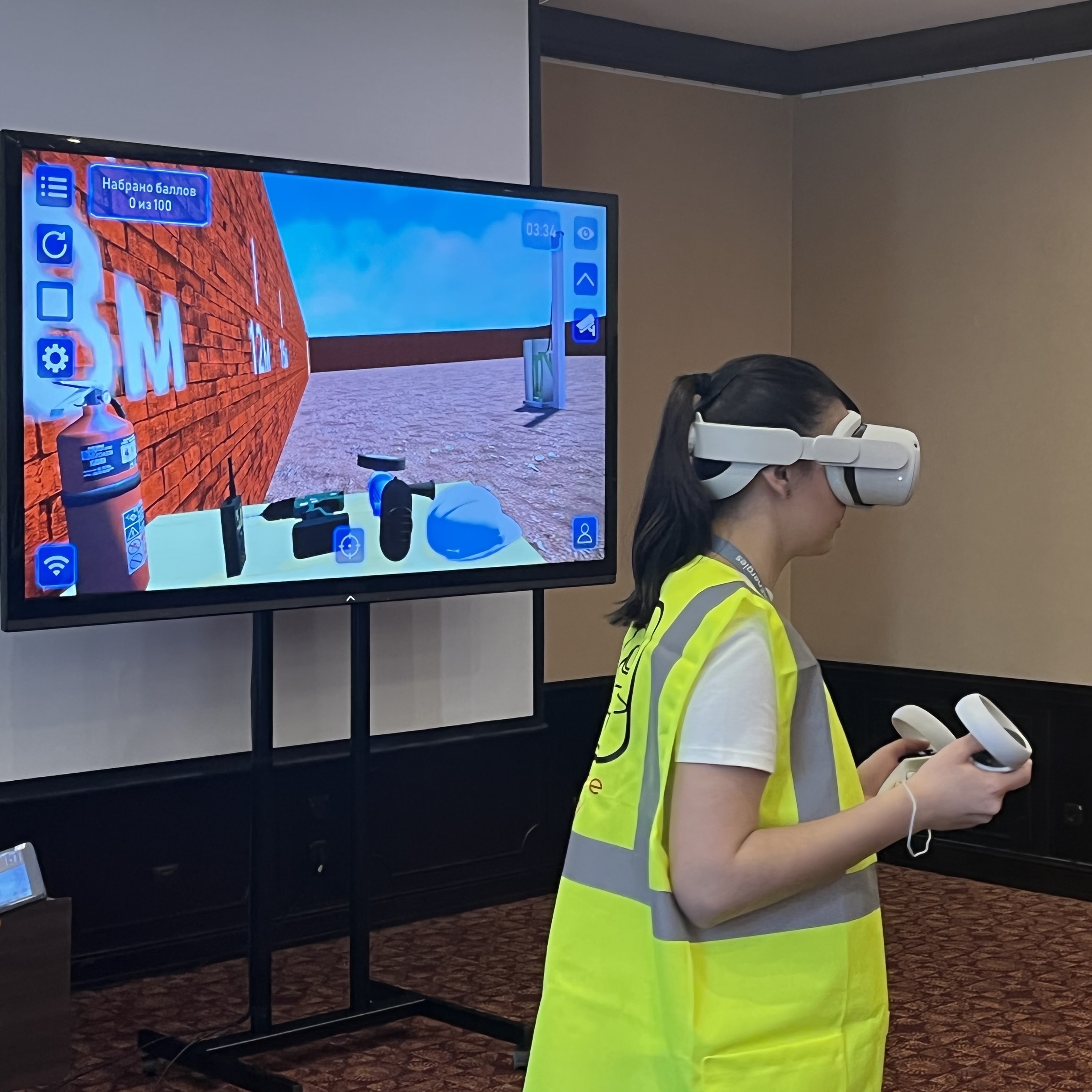
Cast the VR view to a large screen. The group follows the learner’s actions and discusses equipment selection and ways to complete the task.
Results are saved with scores and explanations. Session history can be exported and reviewed over time.
Settings for your training objectives
Vary task settings to practise the same skill under different conditions.
Fall protection systems
For scaffolding ascent, the instructor can select a retractable fall arrest system, a rigid or flexible vertical anchor system, no installed system or a random option.
Session conditions
Choose guided learning or independent practice. Stress factors and a time-pressure mode add challenge; available settings depend on the task.
Immediate feedback on actions
The simulator evaluates both PPE use and suitability for the task. In ascent tasks, choosing an acceptable but less suitable lanyard can reduce the score.
The instructor sees the final score, operation scores and session time. The account provides detailed results, search and Excel export. A recording can be saved on the computer used for casting.
Stress factors and time pressure apply to independent practice. These settings are disabled in guided learning mode.
Training languages
Train in your team’s language
ARPort SafetyVR supports five training languages:
Choose the languages your learners need when requesting your configuration.
Choose a configuration →
Integrate VR into work at height training
Match your training objectives
Use virtual scenarios to practise site assessment, equipment selection, fall protection and emergency response. The instructor selects tasks and reviews results with learners.
Kazakhstan Order No. 1019 · occupational safety training
For programmes delivered in Kazakhstan, these rules define how occupational safety training and knowledge assessment are organised. Combine VR with theory and hands-on PPE practice according to the applicable rules and workplace conditions.
The role of VR in work at height training
In virtual reality
Assess the site, select PPE and fall protection systems, make decisions and repeatedly practise sequences of actions in routine and emergency scenarios.
Repeat tasks with different settings. The instructor reviews correct, incorrect and missed actions.
With real equipment
Practise fitting and adjusting a harness, handling carabiners and devices, and using fall protection and rescue equipment under an instructor’s supervision.
Complement the VR simulator with a compact training ground installed in your classroom. Learn more →
VR and practice with real equipment complement each other.
Who uses the work at height simulator?
Workplaces
Prepare employees for installation, maintenance and other work at height. Repeat equipment selection and responses to changing virtual site conditions.
Training centres
Teach safe work at height and PPE use. Learners complete tasks, the instructor controls settings and the group joins through casting and debriefing.
Universities and colleges
Prepare construction, technical and industrial students for placements and future work. Practise the sequence of actions before entering a real site.
What you need to use the simulator
Clear floor space
At least 2 × 2 m (4 m²), with more space recommended. Extra space allows learners to move freely and improves immersion.
Wi-Fi
The VR headset and instructor tablet must share a Wi-Fi network for device communication and casting. A smartphone hotspot can provide a simple connection.
Internet access
A permanent internet connection is not needed to run an installed simulator. Internet access is needed for software updates and uploading session result logs.
Available configurations
Individual simulator
Software for the work at height simulator. We check equipment compatibility by model. If you need several simulators, consider a bundle.
As part of a bundle
- software for multiple VR simulators
- a standalone VR headset
- an instructor tablet as an optional extra
A bundle costs less than purchasing the same simulators individually.
Work at height simulator FAQs
Can VR fully replace physical practice?
Yes, when the VR simulator is combined with a compact training ground. In VR, learners practise decisions, equipment selection and action sequences; on the training ground, they develop physical skills using real PPE under an instructor’s supervision. Learn more about compact training grounds →
Which tasks are available?
A combined scaffolding scenario, ascent and descent, work positioning, rope access, stepladder and leaning ladder work, evacuation and casualty rescue. An introductory demo task is also available.
Can learners practise rescuing a suspended person?
Yes. The casualty rescue task uses a rescue device to lower a suspended person. Self-evacuation during a fire is covered in a separate task.
Can the fall protection system be changed?
Yes. Scaffolding ascent tasks offer a retractable system, rigid and flexible vertical anchor systems, or no installed vertical system. Available settings depend on the task.
What can learners and instructors see?
Scores and action explanations can be displayed during a session. The final report records the score, completed and missed steps, and time. Detailed results and history can be reviewed and exported.
Do I need a permanent internet connection and a computer?
An installed simulator runs without a permanent internet connection or a computer. The headset and instructor tablet communicate over a shared Wi-Fi network. Internet is needed for software updates and uploading results.
Can I use my existing VR headset?
Yes, if the model is compatible with ARPort SafetyVR. Send us the headset model so we can check compatibility and recommend a configuration.
Does this simulator include roof work?
Roof work is covered by a separate simulator: “Work at Height — Building Roof”. It can be included in the same bundle.
How can I get a quote and demo access?
Use the form below. We’ll discuss your training needs, simulators, equipment, price and demo access.